Author
Francis Ndungu
On this Page
How to Run DeepSeek V4 AI Model with Ollama on Ubuntu 26.04
Published: Last updated:
Introduction
Running large language models locally on your own hardware gives you control over your data and eliminates dependency on third-party APIs. Ollama simplifies the process of downloading, managing, and executing AI models on Linux systems. The tool handles complex configuration and hardware optimization automatically, making local AI deployment accessible without deep machine learning expertise. This approach works well for developers who need offline access to powerful models or want to integrate language AI into their applications without recurring costs.
This guide shows you how to install Ollama and run the DeepSeek V4 model on Ubuntu 26.04.
Prerequisites
Before you start:
-
Purchase an Ubuntu 26.04 Cloud GPU server with at least:
- GPU: NVIDIA H100 (80 GB) or NVIDIA GH200/B200 (next‑gen, higher bandwidth)
- System RAM: 64 GB (minimum), 128 GB preferred for CPU offload
- Free Storage: 160 GB (minimum), 200 GB+ recommended to hold GGUF weights, cache, and logs
- CPU: 16 vCPUs or more (to assist with offload and preprocessing)
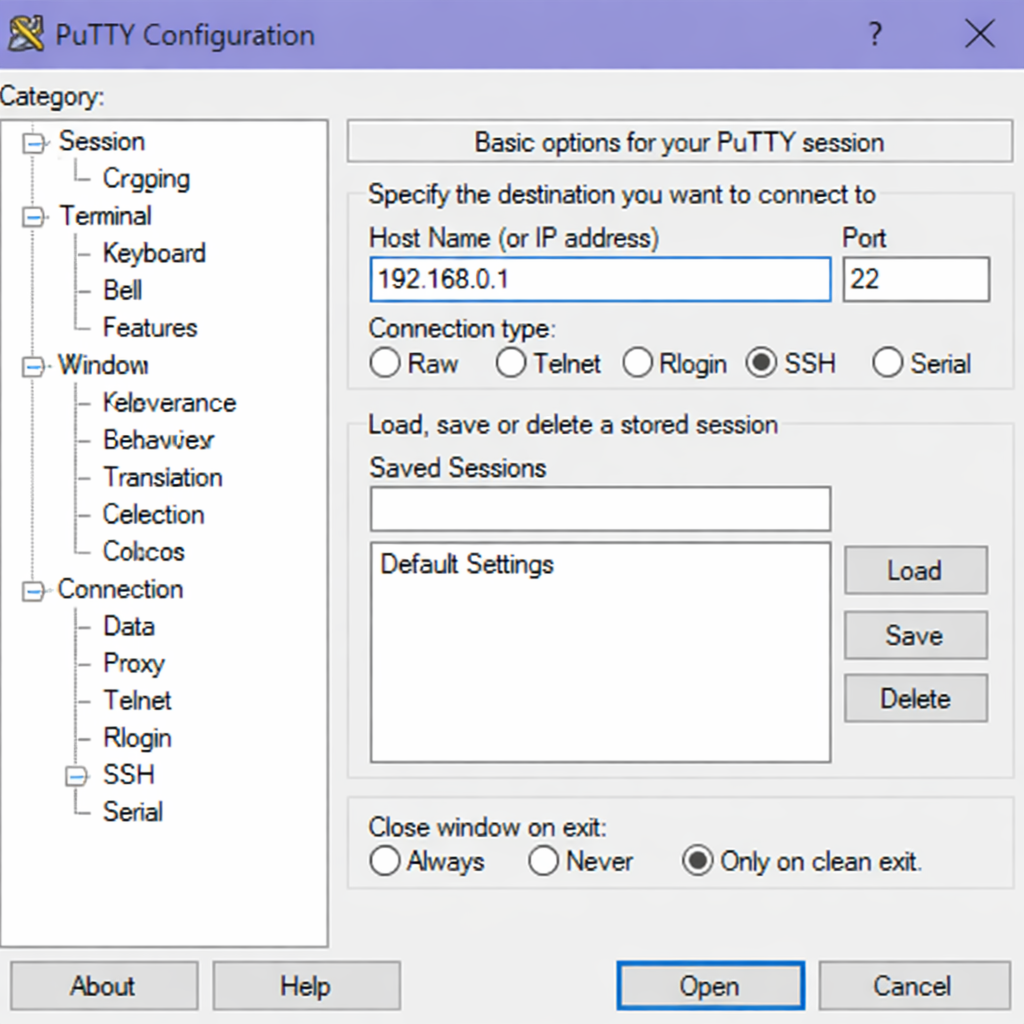
If you don't have an Ubuntu 26.04 GPU, sign up with Vultr and get upto $300 worth of free credit to test the Vultr platform. * Connect to your GPU server through SSH, replace
192.168.0.1with your VPS public IP address..-
Use PuTTY to connect to your VPS .
-
Run the following command in your shell.
console$ ssh username@192.168.0.1
-
Create a non-root user with sudo privileges. Read our guide on How to Create a Non-Root Sudo User on Ubuntu 24.04. You'll use this user's account to run the commands in this guide.
Install Ollama on Ubuntu 26.04
Ollama provides an automated installation script that sets up the service and its dependencies. The script adds the official Ollama repository to your system and installs the necessary binaries.
-
Refresh your system’s package information index.
console$ sudo apt update -
Download and run the Ollama installation script.
console$ curl -fsSL https://ollama.com/install.sh | shOutput:
>>> Installing ollama to /usr/local >>> Downloading Linux amd64 bundle >>> Creating ollama user >>> Adding current user to ollama group >>> Creating ollama systemd service >>> The Ollama API is now available at :::11434 -
Verify the Ollama service is active.
console$ systemctl status ollamaOutput:
● ollama.service - Ollama Service
     Loaded: loaded (/etc/systemd/system/ollama.service; enabled; preset: enabled)
     Active: active (running) since Tue 2026-05-05 14:30:00 UTC; 10s ago
   Main PID: 12345 (ollama)
      Tasks: 8 (limit: 18979)
     Memory: 25.8M
        CPU: 1.2s
Press Ctrl + C to return to the shell prompt.
Pull the DeepSeek V4 Model
Ollama uses a centralized library of pre-trained models. The pull command downloads the model weights to your local system so you can run them without an internet connection.
-
Download the DeepSeek V4 model using Ollama. The download size is approximately 8 GB. The duration depends on your connection speed.
console$ ollama pull deepseek-v4Output:
pulling manifest pulling 44c83434e9c9: 100% ▕███████████████████████████████████████████████▏ 7.8 GB/7.8 GB pulling e78cd803b886: 100% ▕███████████████████████████████████████████████▏ 620 B/620 B pulling 799afb18aed3: 100% ▕███████████████████████████████████████████████▏ 152 B/152 B verifying sha256 digest writing manifest success -
List all downloaded models to confirm DeepSeek V4 is present.
console$ ollama listOutput:
NAME                    ID              SIZE      MODIFIED
deepseek-v4:latest      a1b2c3d4e5f6    7.8 GB    11 seconds ago
Run the DeepSeek V4 Model Interactively
After pulling the model, you can start an interactive chat session directly in your terminal. This method lets you test prompts and explore model behavior in real time.
-
Start the DeepSeek V4 model.
console$ ollama run deepseek-v4Output:
>>> Send a message (/? for help) -
Type a prompt to test the model. For example, ask a general knowledge question.
Who wrote "One Hundred Years of Solitude"?Output:
One Hundred Years of Solitude was written by Gabriel García Márquez, a Colombian author who received the Nobel Prize in Literature in 1982. -
Type
/byeto exit the interactive session when you finish.
Keep the DeepSeek V4 Model Running as a Service
Ollama runs an API server on your local machine, allowing other applications to send requests. By default, the server listens on port 11434.
-
Check the API server status.
console$ curl http://localhost:11434/api/tagsOutput:
{"models":[{"name":"deepseek-v4:latest","modified_at":"2026-05-05T14:32:00.123456789Z","size":7800000000}]}
Test the DeepSeek V4 Model with a REST API Call
You can interact with DeepSeek V4 programmatically using standard HTTP requests. This approach is useful for integrating the model into your scripts or applications.
-
Send a completion request using
/api/generate.console$ curl -X POST http://localhost:11434/api/generate -d '{ "model": "deepseek-v4", "prompt": "Explain what a large language model is in one sentence." }'Output:
{"model":"deepseek-v4","created_at":"2026-05-05T14:35:00Z","response":"A large language model is an AI system trained on vast amounts of text to understand and generate human-like language.","done":true}
Uninstall Ollama (Optional)
If you need to remove Ollama from your system for any reason, the installation script includes an automatic removal process.
-
Run the Ollama uninstall script.
console$ curl -fsSL https://ollama.com/install.sh | sh -s -- --remove -
Delete the local models directory to free up storage space.
console$ sudo rm -rf /usr/share/ollama
Conclusion
In this guide, you have installed Ollama on Ubuntu 26.04, pulled the DeepSeek V4 model from the official library, and run the model interactively in your terminal. You also learned how to access the model through the built-in API server for integration into scripts. Now that you have DeepSeek V4 running locally, consider building a chat interface with a web framework like FastAPI or Streamlit to create your own self-hosted AI assistant.
